Biên tập và chuẩn hóa dữ liệu cho các cohort genomics ung thư

Omicslab Team

Những điểm chính
- Vấn đề. NCBI GEO lưu trữ hơn 8 triệu mẫu với metadata lâm sàng không nhất quán. Biên tập thủ công không thể mở rộng quy mô, còn biên tập hoàn toàn bằng AI chưa đủ đáng tin cậy cho các biến lâm sàng phức tạp.
- Giải pháp. Một pipeline năm giai đoạn, điều khiển bằng cấu hình, thực hiện lọc, tải, tự động biên tập, chuẩn hóa và tổng hợp các bộ dữ liệu GEO thành những cohort ung thư được chuẩn hóa.
- Nghiên cứu điển hình. BRCA-mini — 785 accession GSE ung thư vú được lọc từ GEO và chuẩn hóa theo một schema YAML bao gồm tình trạng thụ thể, các chỉ số sống còn, điều trị và đặc điểm khối u.
- Stack. Backend OmicIDX Parquet, truy vấn DuckDB, tự động biên tập bằng LLM (DeepSeek v4 flash) và giao diện đánh giá Streamlit.
- Có thể tái sử dụng. Cùng một pipeline chung hoạt động cho bất kỳ loại ung thư nào — chỉ khác các mẫu regex đặc thù của cohort và schema YAML.
Các kho dữ liệu omics công khai như NCBI GEO lưu trữ hàng triệu bộ dữ liệu với chú thích lâm sàng phong phú, nhưng việc tận dụng dữ liệu này cho phân tích tổng hợp genomics ung thư quy mô lớn vẫn còn khó khăn. Ba vấn đề dai dẳng đang cản trở:
- Metadata không nhất quán. Cùng một biến lâm sàng được mã hóa khác nhau giữa các nghiên cứu —
er_status,ER Status,estrogen_receptorvàER_IHCđều chỉ tình trạng thụ thể estrogen. - Chú thích nhiễu. Các nghiên cứu trộn lẫn metadata lâm sàng, kỹ thuật và hành chính ở những định dạng phi cấu trúc, khó phân tích bằng chương trình.
- Chênh lệch quy mô. GEO lưu trữ hơn 8 triệu mẫu từ hàng nghìn nghiên cứu. Biên tập thủ công không thể mở rộng quy mô, và biên tập hoàn toàn tự động bằng AI vẫn chưa đủ đáng tin cậy cho các biến lâm sàng phức tạp.
Trong bài viết này, chúng tôi trình bày một pipeline điều khiển bằng cấu hình giúp giải quyết những vấn đề trên cho các cohort genomics ung thư, với ung thư vú (BRCA-mini) làm ví dụ minh họa.
Kiến trúc
Pipeline hoạt động theo năm giai đoạn, tách bạch rõ ràng giữa logic đặc thù của cohort (mẫu regex, schema YAML) và công cụ chung, có thể tái sử dụng (bộ tải dữ liệu, harmonizer, giao diện đánh giá):
Toàn bộ phần triển khai là mã nguồn mở: omicslab-datasets on GitHub.
Giai đoạn 1: Lọc bộ dữ liệu
Điểm khởi đầu là một script Python đặc thù cho cohort, truy vấn các tệp OmicIDX Parquet qua DuckDB để xác định những nghiên cứu GEO phù hợp. Với BRCA-mini, nó lọc theo:
- Các nghiên cứu khớp với mẫu regex ung thư vú (BRCA, TNBC, mammary carcinoma, v.v.)
- Mẫu của người với ít nhất 200 bệnh nhân mỗi nghiên cứu
- Có cả từ khóa điều trị và sống còn trong mô tả nghiên cứu
- Loại trừ các mô hình cell-line, xenograft và in vitro
Các bộ regex mang tính đặc thù cho từng cohort và nằm cạnh script (cohorts/BRCA-mini/scripts/filtering_datasets.py). Đây là phiên bản rút gọn:
BREAST_CANCER_RE = ( r"breast\s?cancer|breast\s?carcinoma|breast\s?tumou?r" r"|mammary\s?cancer|mammary\s?carcinoma" r"|triple.negative\s?breast|invasive\s?breast" r"|ductal\s?carcinoma|lobular\s?carcinoma" r"|TNBC|BRCA.mutant|BRCA1|BRCA2")
TREATMENT_RE = ( r"treatment|chemotherapy|adjuvant|neoadjuvant" r"|tamoxifen|trastuzumab|radiotherapy" r"|hormone\s?therapy|aromatase\s?inhibitor" r"|pembrolizumab|immunotherapy")
SURVIVAL_RE = ( r"survival|outcome|prognosis|recurrence" r"|overall\s?survival|disease\s?free" r"|kaplan\s?meier|cox\s?regression|hazard\s?ratio" r"|death|mortality|relapse|metastasis")Các bộ đầy đủ (với khoảng 30 tên thuốc, 20 thuật ngữ sống còn và 40 mẫu cell-line) được kết hợp thành một truy vấn DuckDB duy nhất, join các tệp Parquet geo_series và geo_samples. Truy vấn trả về 785 accession GSE và ghi vào gse_ids.txt.
Giai đoạn 2: Tải metadata
Lọc trên một nền tảng duy nhất giúp chuẩn hóa các bộ dữ liệu thành một cohort nhất quán nhờ giảm hiệu ứng lô (batch effect) kỹ thuật.
Hai script chung nhận danh sách GSE đã lọc và lấy dữ liệu lâm sàng thô:
fetch_platforms.py — Xác định accession, công nghệ và nhà sản xuất của nền tảng cho từng GSE từ kho OmicIDX Parquet. Xuất ra gse_platforms.csv kèm thống kê tần suất nền tảng trong cohort. Cũng hỗ trợ lọc tùy chọn theo nền tảng qua --platform-ids (các accession GPL phân tách bằng dấu phẩy) hoặc --platform-pattern (regex khớp tiêu đề nền tảng), ghi ra gse_ids_filtered.txt đã lọc.
fetch_clinical.py — Tải metadata lâm sàng thô cho tất cả mẫu GSM trong mỗi GSE, ghi ra các tệp CSV theo từng nghiên cứu (<GSE>_clinical.csv). Sử dụng extension HTTPFS của DuckDB để truy vấn trực tiếp các tệp Parquet từ xa mà không cần tải về cục bộ.
Giai đoạn 3: Biên tập bằng LLM
Bộ tự động biên tập bằng LLM chưa được công bố trên repository.
Biên tập chuyển đổi tên cột và giá trị thô, không nhất quán thành định dạng chuẩn hóa. Pipeline hỗ trợ hai hướng:
- Tự động biên tập bằng LLM sử dụng DeepSeek v4 flash — mô hình đọc từ điển cột của từng bộ dữ liệu và đề xuất ánh xạ cột theo schema của cohort.
- Biên tập thủ công qua giao diện đánh giá Streamlit ở Giai đoạn 4 — con người phê duyệt, từ chối hoặc chỉnh sửa đề xuất của LLM.
Giai đoạn 4: Chuẩn hóa
Phần này đề cập đến việc chuẩn hóa metadata. Việc kết hợp chính các phép đo omics sẽ tạo ra hiệu ứng lô và cần một bước riêng (ComBat, limma hoặc một phương pháp học sâu). Chúng tôi sẽ trình bày về hiệu chỉnh hiệu ứng lô trong bài tiếp theo của series này.
Pipeline cung cấp hai công cụ bổ trợ cho bước chuẩn hóa:
Giao diện đánh giá tương tác (curation_app.py) — một dashboard Streamlit với hai trang:
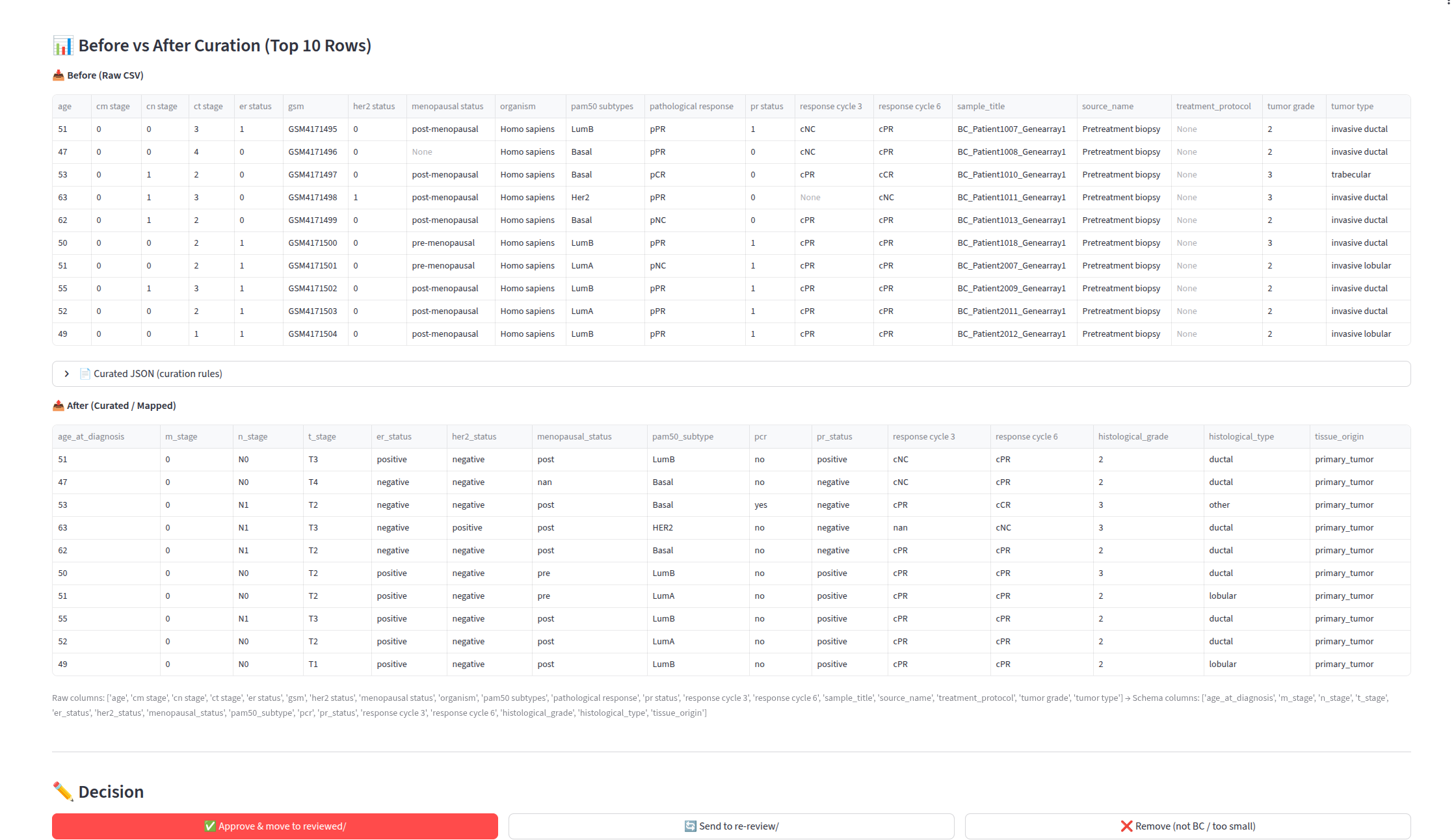
- Tổng quan và Tiến độ — các KPI (bộ dữ liệu, mẫu, số lượng điều trị/sống còn), biểu đồ phân bố loại omics, mức sử dụng nền tảng và tiến độ biên tập với số lượng phê duyệt, xem lại và loại bỏ.
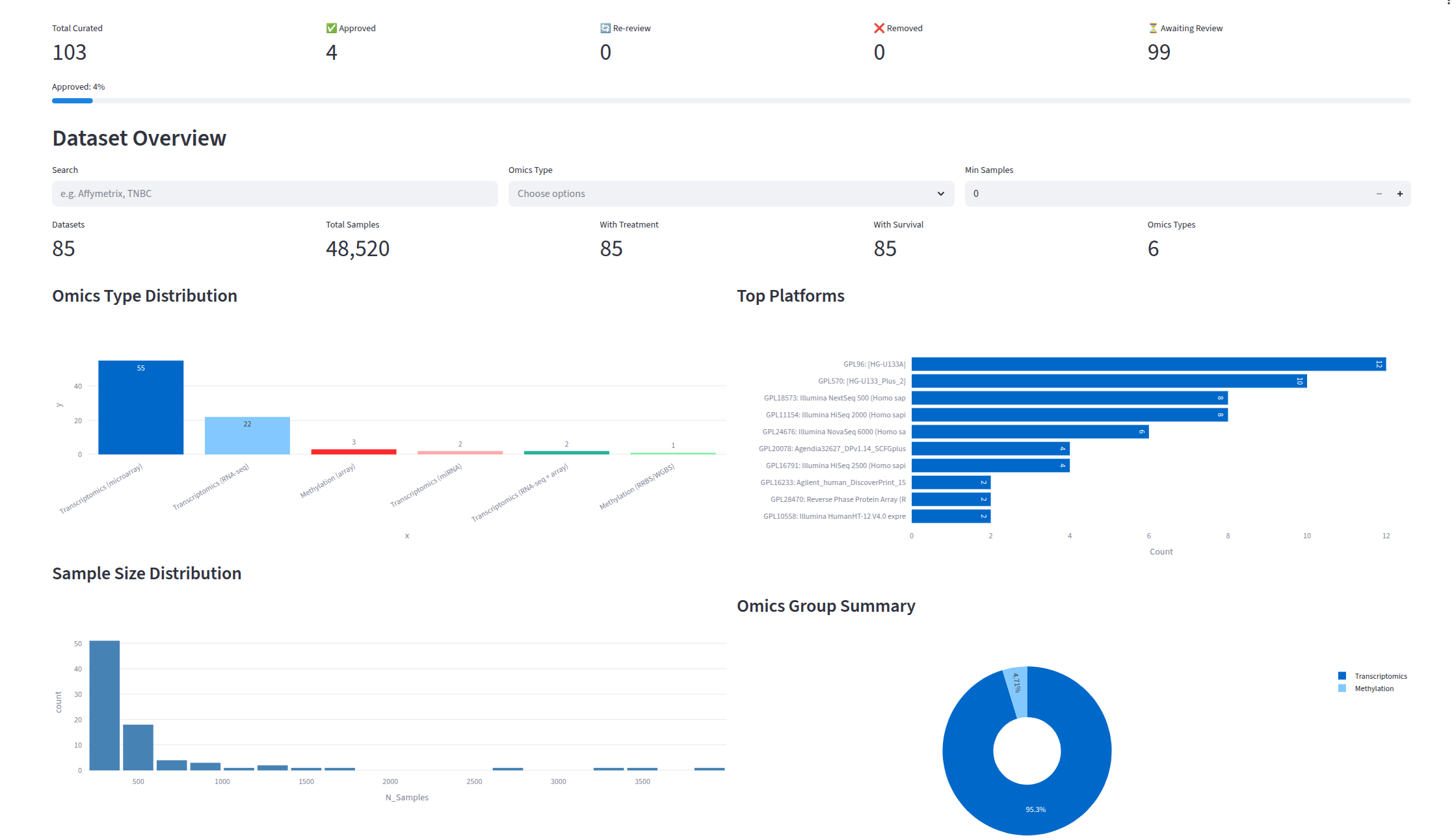
- Bảng đánh giá — xem trước song song trước và sau cho từng bộ dữ liệu đã biên tập, hiển thị những cột nào đã được ánh xạ, giá trị được chuyển đổi như thế nào, cùng thao tác phê duyệt, xem lại và loại bỏ chỉ với một cú nhấp.
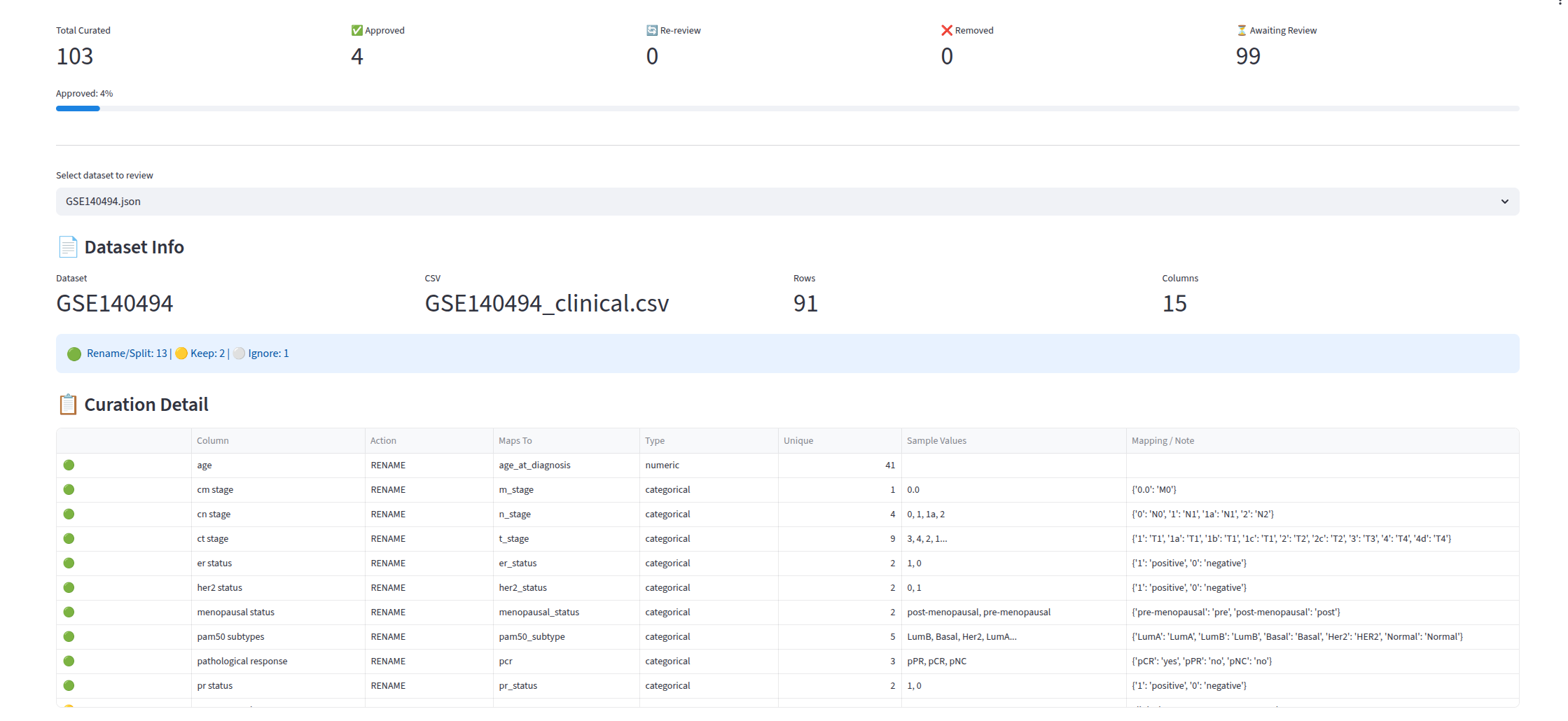
Harmonizer (được nhúng trong curation_app.py với tên build_after_df) — sử dụng column_mappings.json do LLM tạo ra và tạo các bộ dữ liệu đầu ra đã chuẩn hóa. Nó:
- Đổi tên cột thành tên biến trong schema
- Chuẩn hóa các giá trị phân loại bằng mẫu regex định nghĩa trong schema YAML
- Chuyển đổi đơn vị (ngày sang tháng, cm sang mm) qua các quy tắc hậu xử lý
- Kiểm tra kiểu dữ liệu (trường số chỉ chứa số, biến cố nhị phân chỉ chứa 0, 1, FALSE hoặc TRUE)
Một tệp column_mappings.json điển hình cho một bộ dữ liệu đã biên tập trông như sau (trích từ GSE103091.json):
{ "file": "GSE103091_clinical.csv", "n_rows": 238, "n_cols": 16, "columns": { "adjuvant chemotherapy": { "curation": { "action": "rename", "maps_to": "chemotherapy", "type": "categorical", "value_mapping": { "1.0": "yes", "0.0": "no" } } }, "age at diag": { "curation": { "action": "rename", "maps_to": "age_at_diagnosis", "type": "numeric" } }, "os (days)": { "curation": { "action": "rename", "maps_to": "os_time_months", "type": "numeric", "post_process": "to_months" } }, "er-ihc": { "curation": { "action": "rename", "maps_to": "er_status", "type": "categorical", "value_mapping": { "0": "negative", "1": "positive" } } } }}Các khóa action, maps_to và value_mapping là hợp đồng giữa bộ tự động biên tập LLM và hàm build_after_df trong curation_app.py — schema cho các loại ung thư mới chỉ cần khai báo biến đích mới, không cần logic ánh xạ mới.
Giai đoạn 5: Tổng hợp
Báo cáo chất lượng tự động cung cấp:
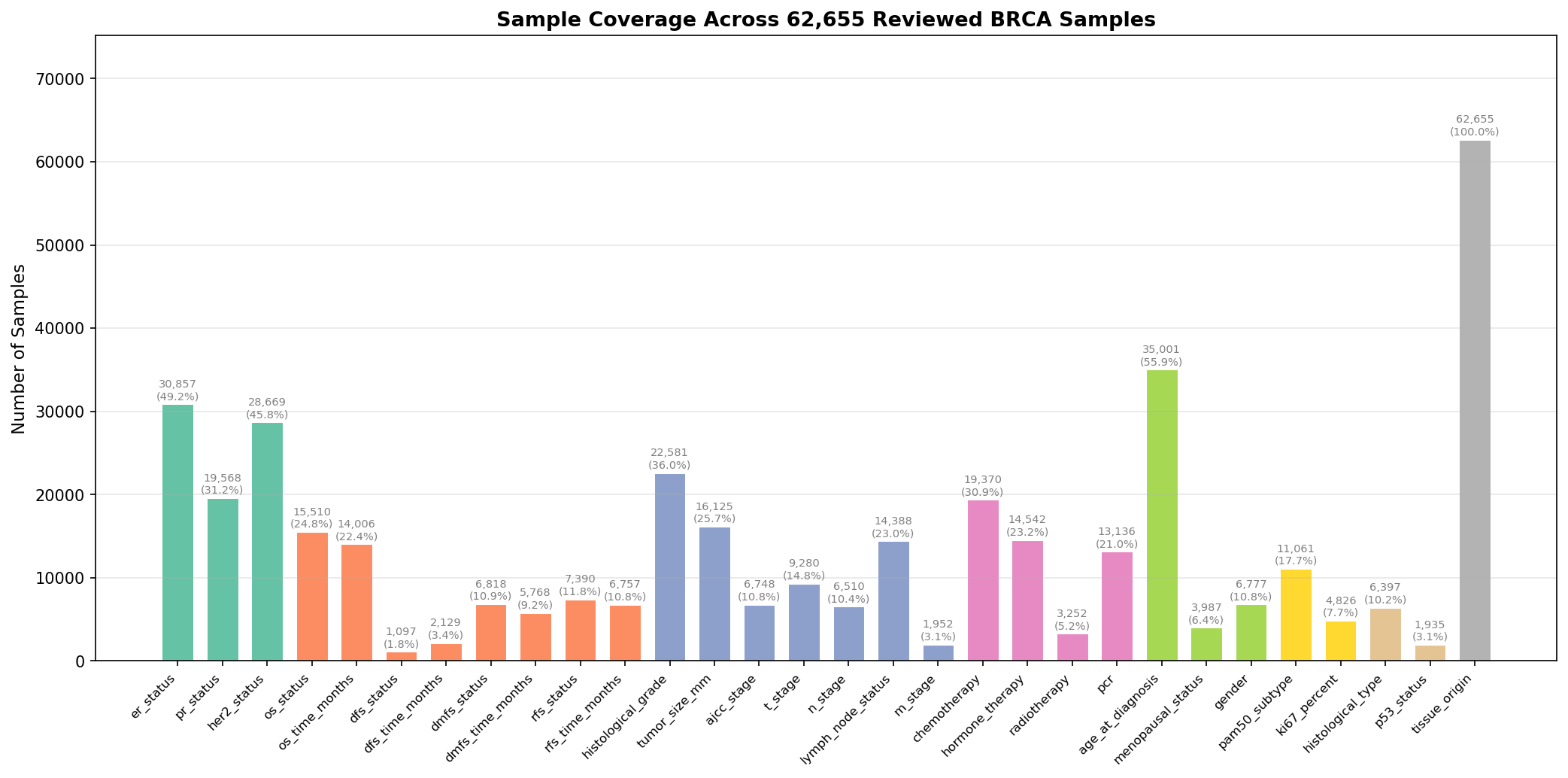
- Thống kê độ phủ theo từng biến (phần trăm bộ dữ liệu có mỗi biến đã chuẩn hóa)
- Phân bố của các biến phân loại trong cohort
- Tóm tắt về nền tảng và loại omics
- Heatmap về độ đầy đủ của dữ liệu
Pipeline BRCA-mini đầy đủ (785 bộ dữ liệu, hơn 238 nghìn mẫu) tạo ra một cohort đã chuẩn hóa với độ phủ theo từng biến như hình dưới:
Schema BRCA chuẩn hóa
Mỗi loại ung thư định nghĩa một schema YAML với các nhóm biến. Schema BRCA bao gồm:
| Nhóm | Biến |
|---|---|
| Tình trạng thụ thể | Tình trạng ER, PR, HER2 |
| Chỉ số sống còn | OS, DFS, DMFS, RFS (biến cố kèm thời gian tính theo tháng) |
| Đặc điểm khối u | Độ mô học, kích thước khối u (mm), giai đoạn AJCC, T, N, M, tình trạng hạch bạch huyết |
| Điều trị | Hóa trị, liệu pháp hormone, xạ trị, đáp ứng hoàn toàn bệnh lý |
| Nhân khẩu học | Tuổi khi chẩn đoán, tình trạng mãn kinh, giới tính |
| Phân tử | Phân nhóm PAM50, chỉ số tăng sinh Ki67 |
| Khác | Loại mô học, tình trạng p53, nguồn gốc mô |
Schema YAML nằm tại cohorts/BRCA-mini/config/brca_schema.yaml và là nguồn chân lý duy nhất cho cả bộ biên tập LLM lẫn harmonizer.
OmicIDX: Backend dữ liệu
Nền tảng cho pipeline biên tập là OmicIDX, một giải pháp thay thế cloud-native cho SRAdb và GEOmetadb cũ. Nó bao gồm:
- Parsers (
omicidx-parsers) — các parser định dạng XML và SOFT an toàn kiểu cho NCBI SRA, GEO, BioSample và PubMed, tạo ra các mô hình Pydantic v2. - ETL (
omicidx-etl) — các pipeline extract-transform-load chuyển dữ liệu NCBI thô thành các tệp Parquet phân vùng trên lưu trữ tương thích S3 (Cloudflare R2), có thể truy cập qua DuckDB với HTTPFS. - API (
omicidx-api) — REST API FastAPI chỉ đọc, triển khai tạiapi-omicidx.cancerdatasci.orgvới phân trang keyset cursor và response envelope nhất quán. - Orchestrator (
omicidx-dagster) — các asset Dagster lập lịch chạy ETL hằng ngày, đồng bộ với cả DuckDB (để truy vấn) và PostgreSQL (cho API).
Kiến trúc này cho phép truy vấn hơn 80 triệu SRA run và hơn 8 triệu mẫu GEO trong vài mili giây bằng DuckDB cục bộ, không cần máy chủ cơ sở dữ liệu đang chạy — lý tưởng cho các quy trình nghiên cứu ngoại tuyến và có thể tái lập.
Bắt đầu nhanh
Yêu cầu trước
git clone --recursive https://github.com/vieomics/omicslab-datasets.gitcd omicslab-datasetspixi shellChạy toàn bộ pipeline BRCA-mini
# 1. Filter datasets for breast cancer (cohort-specific)pixi run python cohorts/BRCA-mini/scripts/filtering_datasets.py \ --parquet-dir cohorts/BRCA-mini/parquet \ --output cohorts/BRCA-mini/datasets/gse_ids.txt
# 2. Fetch platform and clinical datapixi run python apps/fetch_platforms.py \ --parquet-dir cohorts/BRCA-mini/parquet \ --gse-ids cohorts/BRCA-mini/datasets/gse_ids.txt \ --output-dir cohorts/BRCA-mini/datasets/raw
pixi run python apps/fetch_clinical.py \ -i cohorts/BRCA-mini/datasets/gse_ids.txt \ -o cohorts/BRCA-mini/datasets/raw \ --parquet-dir cohorts/BRCA-mini/parquet
# 3. LLM auto-curation (requires OPENAI_API_KEY)pixi run python apps/agent_curate.py BRCA-mini
# 4. Launch interactive curation review UIpixi run streamlit run apps/curation_app.py -- \ --raw-dir cohorts/BRCA-mini/datasets/raw \ --curated-dir cohorts/BRCA-mini/datasets/curated_json \ --output-dir cohorts/BRCA-mini/output/jsonThêm một loại ung thư mới
Để thêm hỗ trợ cho một loại ung thư mới, ví dụ LUAD (ung thư biểu mô tuyến phổi):
- Thêm một mục mới trong
cohorts/cancers.yamlvới các mẫu regex cho loại ung thư, từ khóa điều trị, từ khóa sống còn và mẫu loại trừ. - Tạo
cohorts/LUAD/config/luad_schema.yamlđịnh nghĩa các biến đích và ánh xạ giá trị. - Tạo
cohorts/LUAD/scripts/filtering_datasets.pyvới các bộ lọc regex đặc thù cho LUAD. - Chạy các bước pipeline chung tương tự — tất cả các script khác đều không phụ thuộc loại ung thư.
Khi nào nên dùng pipeline này
Pipeline này phù hợp nếu bạn:
- Đang xây dựng một cohort phân tích tổng hợp theo loại ung thư (BRCA, LUAD, COAD, v.v.) từ dữ liệu GEO công khai.
- Cần chuẩn hóa metadata lâm sàng không đồng nhất trên hàng chục hoặc hàng trăm nghiên cứu.
- Muốn một quy trình biên tập có thể tái lập, được quản lý phiên bản chạy trong CI.
- Thành thạo Python, DuckDB và biên tập có sự hỗ trợ của LLM.
Đây không phải công cụ phù hợp nếu bạn chỉ cần một bộ dữ liệu duy nhất, hoặc nếu dữ liệu của bạn đã ở định dạng bảng sạch với schema đã biết.
Câu hỏi thường gặp
Sự khác biệt giữa curation và harmonization trong pipeline này là gì?
Curation (biên tập) ánh xạ tên cột thô, đặc thù từng bộ dữ liệu sang tên biến chuẩn hóa định nghĩa trong schema của cohort (ví dụ er-ihc sang er_status). Harmonization (chuẩn hóa) sau đó chuẩn hóa chính các giá trị (ví dụ 0/1 sang negative/positive) và chuyển đổi đơn vị (ví dụ ngày sang tháng). Pipeline giữ hai giai đoạn này tách biệt để LLM tập trung vào bài toán ánh xạ khó hơn, trong khi harmonizer tất định xử lý việc chuyển đổi đơn vị.
Tại sao dùng DuckDB thay vì PostgreSQL cho giai đoạn lọc?
DuckDB đọc trực tiếp các tệp Parquet qua HTTPFS mà không cần nạp chúng vào máy chủ cơ sở dữ liệu, nghĩa là toàn bộ chỉ mục GEO với 8 triệu mẫu có thể được truy vấn từ một laptop trong vài giây. Cùng một truy vấn mất hàng phút trên PostgreSQL lại chạy dưới một giây trên DuckDB với khối lượng công việc này. PostgreSQL vẫn được dùng cho tầng API của OmicIDX, nơi phân trang giao dịch quan trọng hơn tốc độ quét thô.
Tôi có thể dùng một LLM khác cho bước tự động biên tập không?
Có. Bộ biên tập đọc cấu hình từ khối llm_config trong schema YAML (provider, model, api_key_env, max_columns_per_batch). Chỉ cần thay provider và model để trỏ đến OpenAI, Anthropic hoặc một mô hình cục bộ — hợp đồng là tệp JSON ánh xạ cột, vốn không phụ thuộc mô hình.
Toàn bộ pipeline BRCA-mini chạy từ đầu đến cuối mất bao lâu?
Trên một laptop, năm giai đoạn mất khoảng: lọc 30 giây, tải nền tảng 1 phút, tải dữ liệu lâm sàng 5 đến 10 phút (tùy kích thước lô), biên tập bằng LLM 10 đến 30 phút (tùy giới hạn token và tỷ lệ phê duyệt), và chuẩn hóa 1 phút. Phần lớn thời gian là bước LLM, vốn có thể song song hóa giữa các bộ dữ liệu.
Xử lý hiệu ứng lô giữa các bộ dữ liệu như thế nào?
Pipeline này tập trung vào chuẩn hóa metadata, không phải hiệu chỉnh hiệu ứng lô ở cấp phép đo. Việc kết hợp chính các ma trận omics (ví dụ, expression count) đòi hỏi các bước bổ sung như ComBat, limma hoặc một phương pháp học sâu mới hơn.
Bài tiếp theo trong series này sẽ trình bày cách chuẩn hóa dữ liệu omics (ma trận biểu hiện, giá trị beta methylation, v.v.) trên cohort đã biên tập — giải quyết việc loại bỏ hiệu ứng lô mà không mất tín hiệu sinh học, giữ cấu trúc nhóm cho mô hình hóa AI/ML ở hạ nguồn, và tạo ra các bộ dữ liệu hợp nhất sẵn sàng phân tích.
Đầu ra có phù hợp cho phân tích sống còn không?
Có. Schema đã chuẩn hóa bao gồm os_status và os_time_months, dfs_status và dfs_time_months, dmfs_status và dmfs_time_months, cùng rfs_status và rfs_time_months ở định dạng (event, time) chuẩn mà lifelines, gói survival của R và scikit-survival mong đợi.
Bài viết liên quan
- Xem thêm các bài viết về biên tập và chuẩn hóa dữ liệu và genomics ung thư.
- Xem các giải pháp nền tảng dữ liệu của chúng tôi cho những triển khai OmicIDX được quản lý.
- Cần một pipeline tùy chỉnh cho cohort của bạn? Liên hệ với chúng tôi để trao đổi phạm vi dự án.
Tài liệu tham khảo
- OmicIDX — giải pháp thay thế cloud-native cho SRAdb và GEOmetadb, với parsers, pipeline ETL, API và điều phối Dagster.
- omicslab-datasets — monorepo pipeline biên tập với cấu hình cohort và công cụ chung.
- NCBI GEO — Gene Expression Omnibus, kho dữ liệu genomics chức năng công khai.
- DuckDB — cơ sở dữ liệu phân tích trong tiến trình, cho phép truy vấn cục bộ trên các tệp Parquet từ xa.
Bài viết gần đây

28 tháng 09, 2026
Hướng dẫn xây dựng bộ genome vi khuẩn không cần lập trình

4 tháng 05, 2026
Pipeline phân tích methyl hóa từ dữ liệu đọc ngắn với Nextflow
3 tháng 05, 2026