
Pipeline gọi biến thể germline từ dữ liệu đọc ngắn với Nextflow
Chúng tôi chứng minh rằng việc sử dụng fastp, bwa-mem2 và deep-variant có thể đạt hiệu năng tương đương trên bộ dữ liệu HG002 GIAB, cho thấy một bộ công cụ tối giản vẫn cho kết quả ngang với nf-core/sarek với đầy đủ hỗ trợ profile.
nf-core/sarek được xem là một pipeline hàng đầu cho việc gọi biến thể từ dữ liệu đọc ngắn ở cả quy trình germline lẫn somatic, với sự hậu thuẫn của một cộng đồng lớn và năng động. Tuy nhiên, nó vẫn tồn tại một số hạn chế:
- Định kiến về danh tiếng: Những công cụ được sử dụng rộng rãi thường được giữ làm mặc định, kể cả khi chúng có thể không còn mang lại hiệu năng tốt nhất. Điều này có thể dẫn đến việc tiêu tốn tài nguyên không cần thiết và hiệu quả dưới mức tối ưu ở một số bước.
- Tính năng cũ tồn đọng: Một số công cụ được tích hợp đã không còn được duy trì tích cực trong nhiều năm, dẫn đến khoảng cách về hiệu năng. Dù vậy, chúng thường vẫn được giữ lại để đảm bảo tương thích ngược, làm tăng độ phức tạp của codebase và gánh nặng bảo trì khi bổ sung tính năng mới.
- Hạn chế về khả năng tùy biến: Pipeline được thiết kế cho mục đích đa dụng và hướng nghiên cứu. Trong môi trường sản xuất công nghiệp, các workflow thường cần được tinh gọn — chỉ giữ lại những bước thiết yếu và đạt khả năng mở rộng gần như tuyến tính theo tài nguyên. Trong những trường hợp như vậy, một cách tiếp cận tối giản và được thiết kế chuyên biệt thường hiệu quả hơn.
Vì vậy, chúng tôi phát triển nf-germline-short-read-variant-calling pipeline nhằm hỗ trợ xây dựng cohort dân số quy mô lớn cho các dự án biobank, được tối ưu cho việc gọi biến thể germline từ dữ liệu giải trình tự đọc ngắn với độ phủ ~30×.
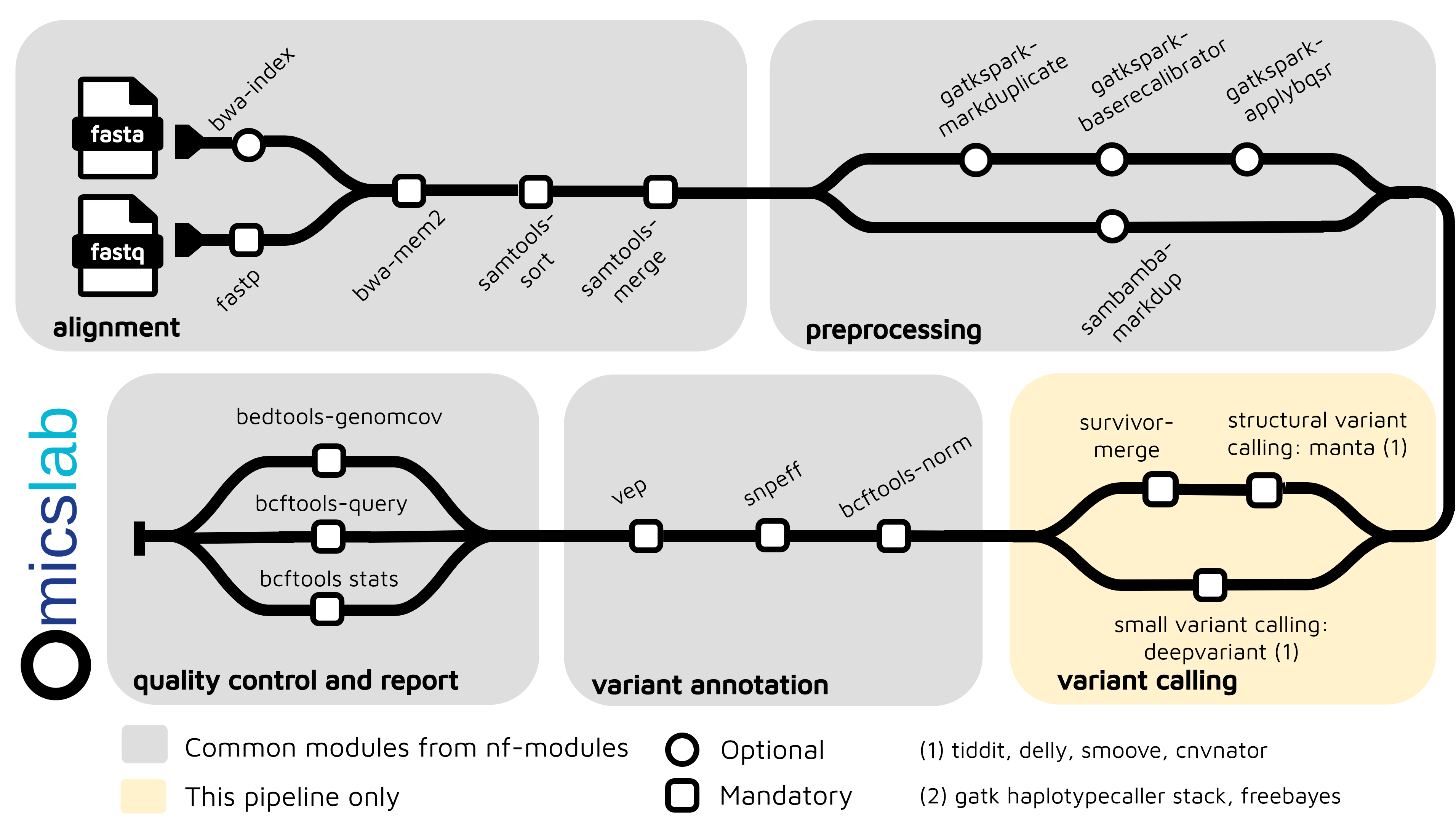
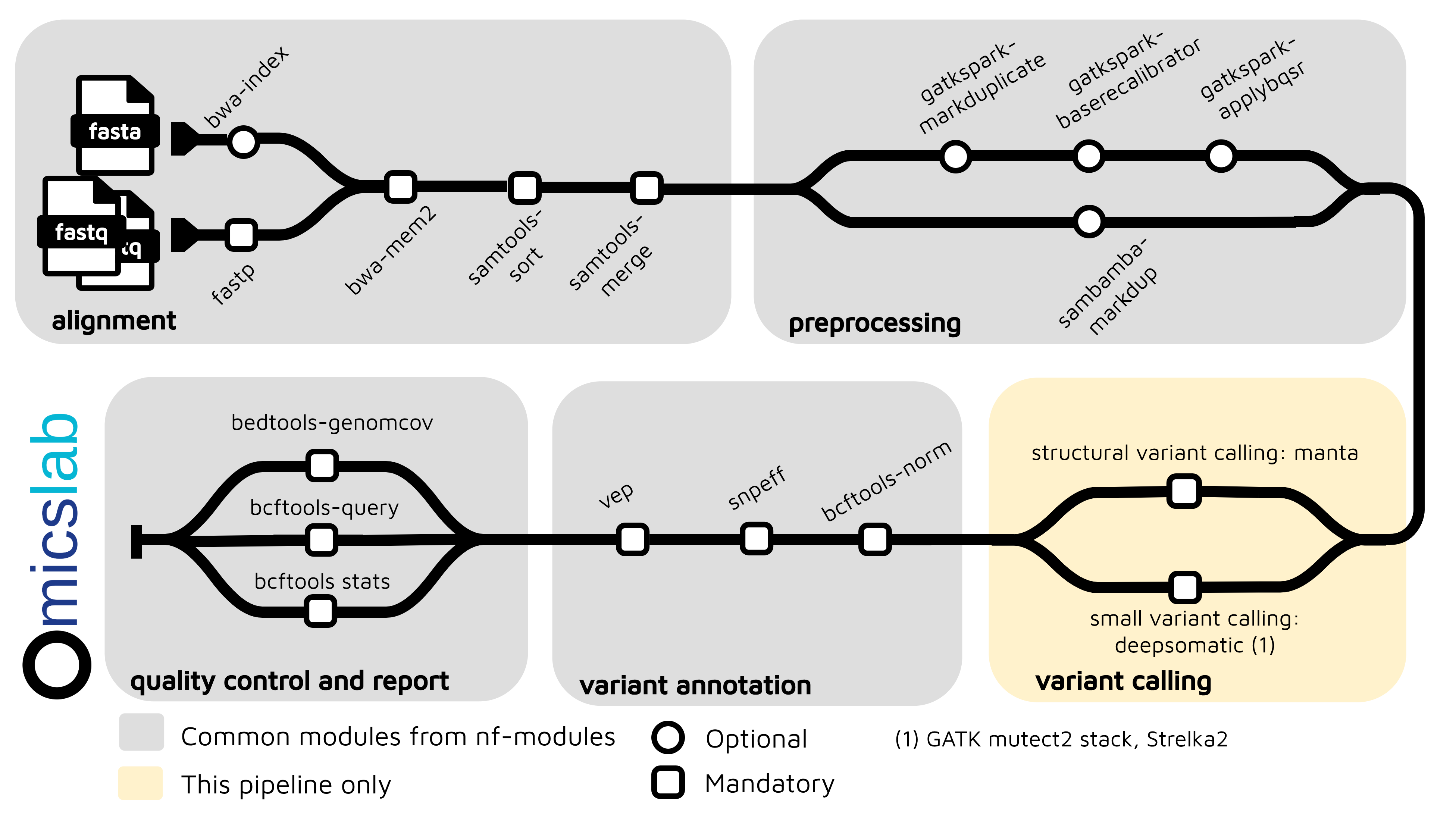
Kiến trúc
Tính năng chính
- Nhiều định dạng đầu vào: FASTQ (toàn bộ pipeline), BAM và CRAM (bỏ qua alignment, tự động chuyển đổi)
- Nhiều công cụ gọi biến thể: DeepVariant (mặc định), GATK HaplotypeCaller, FreeBayes
- Kiểm soát chất lượng: Fastp, bcftools stats, bcftools query, bedtools genomecov
- Chú giải biến thể: SnpEff, VEP
- Biến thể cấu trúc: Manta, Delly, TIDDIT, LUMPY, CNVnator (hỗ trợ nhiều công cụ)
- Nén CRAM: Tích hợp sẵn chuyển đổi CRAM→BAM để gọi lại biến thể hiệu quả
- Cấu hình linh hoạt: Hỗ trợ container (Docker/Singularity), nhiều profile
- Công cụ benchmark: Tích hợp Truvari để benchmark SV
Benchmark
Kết quả benchmark: https://github.com/vieomics/nf-germline-short-read-variant-calling/tree/main/benchmark
Hiệu năng benchmark SNP và INDEL
Cả hai pipeline đều đạt độ chính xác SNP và INDEL xuất sắc với DeepVariant. Pipeline nf-germline-short-read cho hiệu năng tương đương nf-core/sarek trong khi vẫn duy trì một workflow đơn giản, tinh gọn hơn được tối ưu riêng cho việc gọi biến thể germline.
Pipeline này được tối ưu riêng cho việc phát hiện SNP và INDEL nhỏ bằng DeepVariant với bước tiền xử lý được bỏ qua. Kết quả benchmark trên HG002 (Genome in a Bottle) cho thấy hiệu năng cạnh tranh với nf-core/sarek:
Hiệu năng phát hiện SNP (HG002 - DeepVariant)
| Pipeline | Recall | Precision | F1 Score | TP | FN |
|---|---|---|---|---|---|
| nf-germline-short-read-variant-calling | 99.39% | 99.82% | 99.60% | 3,344,672 | 20,455 |
| nf-core/sarek | 99.39% | 99.84% | 99.61% | 3,344,549 | 20,578 |
Hiệu năng phát hiện INDEL (HG002 - DeepVariant)
| Pipeline | Recall | Precision | F1 Score | TP | FN |
|---|---|---|---|---|---|
| nf-germline-short-read-variant-calling | 98.78% | 99.38% | 99.08% | 519,079 | 6,390 |
| nf-core/sarek | 98.97% | 99.46% | 99.21% | 520,048 | 5,421 |
Gọi biến thể cấu trúc
Kết quả benchmark trên HG002:
- Sensitivity: 7.88% (1,082 TP trong tổng số 13,732 biến thể)
- Precision: 36.8% (1,082 TP trong 2,940 kết quả gọi)
- Genotype Concordance: 90.39%
Bắt đầu nhanh
Cấu hình cho trường hợp sử dụng chính
Cấu hình mặc định sử dụng:
- DeepVariant làm công cụ gọi biến thể
- Hệ gen tham chiếu GRCh38
- Lọc chất lượng bằng FASTP
- Bỏ qua tiền xử lý (skip_preprocessing: true)
- Bật chú giải SnpEff + VEP
pixi run nextflow run main.nf -profile docker -resumeChuẩn bị samplesheet
Tạo một samplesheet CSV với dữ liệu đầu vào của bạn. Pipeline hỗ trợ ba chế độ đầu vào:
Đầu vào FASTQ (toàn bộ pipeline)
sample,lane,fastq_1,fastq_2HG002,L001,/path/to/HG002_R1.fastq.gz,/path/to/HG002_R2.fastq.gzHG003,L001,/path/to/HG003_R1.fastq.gz,/path/to/HG003_R2.fastq.gzĐầu vào BAM (bỏ qua alignment)
sample,lane,bam,baiHG002,L001,/path/to/HG002.bam,/path/to/HG002.bam.baiHG003,L001,/path/to/HG003.bam,/path/to/HG003.bam.baiĐầu vào CRAM (bỏ qua alignment + tự động chuyển đổi)
sample,lane,cram,craiHG002,L001,/path/to/HG002.cram,/path/to/HG002.cram.craiHG003,L001,/path/to/HG003.cram,/path/to/HG003.cram.craiLợi ích của CRAM:
- Đầu vào được nén: Tệp CRAM nhỏ hơn BAM khoảng 4 lần (nén 78%)
- Pipeline nhanh hơn: Bỏ qua bước alignment khi chạy lại việc gọi biến thể
- Chuyển đổi tự động: Chuyển đổi CRAM→BAM được tích hợp vào pipeline
- Hỗ trợ mọi công cụ gọi biến thể: DeepVariant, GATK, FreeBayes và tất cả công cụ gọi SV (Manta, Delly, TIDDIT, LUMPY, CNVnator)
Các cột trong samplesheet:
sample: Định danh mẫulane: Lane giải trình tự (nếu có nhiều lane, hãy tạo dòng riêng cho từng lane)- Chế độ FASTQ:
fastq_1,fastq_2(tệp FASTQ nén gzip) - Chế độ BAM:
bam,bai(BAM đã align + index) - Chế độ CRAM:
cram,crai(alignment đã nén + index)
Chạy pipeline
Pipeline sẽ tự động phát hiện định dạng đầu vào (FASTQ, BAM hoặc CRAM) để chạy các bước phù hợp:
nextflow run main.nf \ --input samplesheet.csv \ --profile docker \ -resumeTùy chọn nâng cao
# With multiple SV callersnextflow run main.nf \ --input samplesheet_cram.csv \ --structural_variant_caller "manta,delly,lumpy" \ --profile docker \ -resume
# Skip annotation for faster processingnextflow run main.nf \ --input samplesheet.csv \ --skip_annotation \ --profile docker \ -resume
# Use alternative variant caller (GATK or FreeBayes)nextflow run main.nf \ --input samplesheet.csv \ --small_variant_caller gatk \ --profile docker \ -resumeĐể chạy chế độ test với dữ liệu mẫu:
nextflow run main.nf -profile docker,test -resumeXem kết quả
Các tệp đầu ra sẽ được tạo trong thư mục results/. Cấu trúc tệp phụ thuộc vào chế độ đầu vào:
Kết quả đầu vào FASTQ:
results/alignment/*.bam- Tệp BAM đã alignresults/alignment_qc/- Báo cáo chất lượng alignmentresults/variant_calling/*.vcf.gz- Kết quả gọi biến thể thôresults/variant_annotation/*.vcf- Biến thể đã chú giải
Kết quả đầu vào CRAM:
results/variant_calling/*.vcf.gz- Kết quả gọi biến thể thô (từ BAM đã chuyển đổi)results/variant_annotation/*.vcf- Biến thể đã chú giải- Không có tệp BAM trung gian (bị loại bỏ sau khi gọi biến thể trừ khi được cấu hình khác)
Các tệp đầu ra chung:
results/multiqc_report.html- Báo cáo kiểm soát chất lượng tương tácresults/pipeline_info/- Timeline thực thi và trace log
Để biết thêm các cách sử dụng nâng cao và tùy chọn cấu hình, xem tài liệu Pipeline Architecture.
Tài liệu tham khảo
- nf-core/sarek: Pipeline phân tích để phát hiện biến thể germline hoặc somatic (tiền xử lý, gọi biến thể và chú giải) từ WGS / giải trình tự targeted
- https://github.com/vieomics/nf-germline-short-read-variant-calling: Pipeline cấp production cho việc gọi biến thể germline từ dữ liệu đọc ngắn sử dụng Nextflow với độ phủ 30X
Bài viết gần đây
28 tháng 09, 2026
Hướng dẫn xây dựng bộ genome vi khuẩn không cần lập trình



4 tháng 05, 2026
Pipeline phân tích methyl hóa từ dữ liệu đọc ngắn với Nextflow
3 tháng 05, 2026